
Migration FAQ
Find answers about the new product migration, including login steps, fund safety, trading continuity, payments, referral programs, and support to ensure a smooth transition.


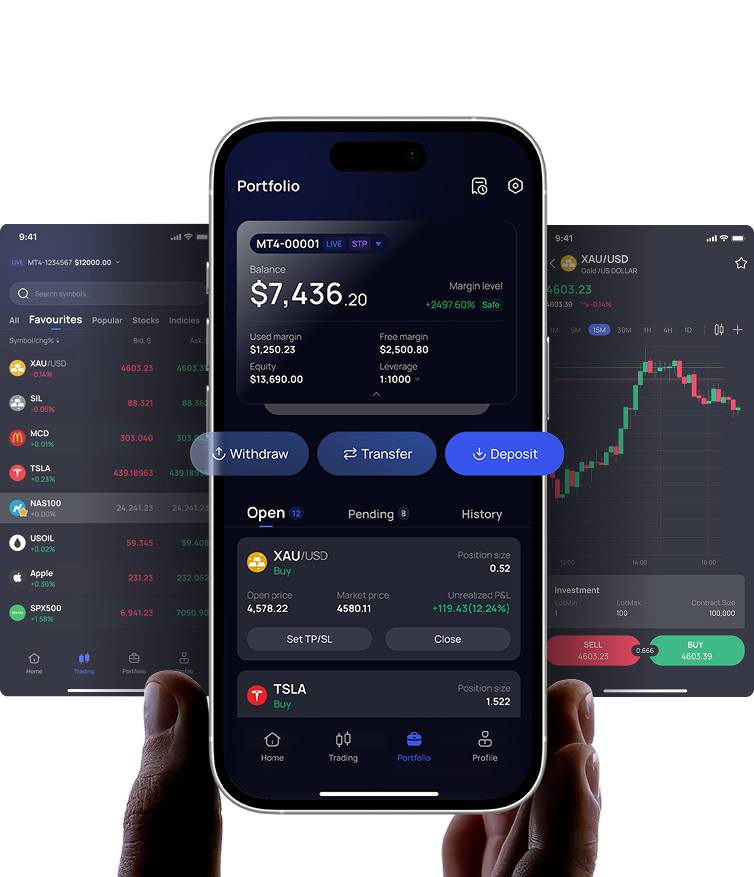
Why am I being migrated to the new Traze app and portal?
We have launched a brand new platform to give you the best possible trading experience.
The new app and portal are built from the ground up with stronger security, a simpler and more user-friendly design, faster transactions, and new features.
The new app and portal are built from the ground up with stronger security, a simpler and more user-friendly design, faster transactions, and new features.
Do I need to create a new account?
No. You do not need to create a new account.
Your existing account will be automatically transferred to the new app. Once the migration is complete, you can continue using your account as usual without registering again.
Your existing account will be automatically transferred to the new app. Once the migration is complete, you can continue using your account as usual without registering again.
How do I log in to the new app and portal?
You can log in using your registered email address or phone number.
For security reasons, you will need to update your password when using the new app or portal for the first time. Please click “Forgot Password” on the login screen and follow the steps to set a new password.
What happens to my Verification (Identity Verification) status?
Your verification status will be migrated. You do not need to resubmit your documents. You can view your current status in the “Profile” section after logging in.
You will only be asked to update your information if:
- Your ID document on file has expired.
- Your documentation requires an update to meet new regulatory standards.
Is my personal data safe during the migration?
Absolutely. We use industry-standard encryption protocols to ensure that your personal information and identity documents are transferred securely. Data privacy remains our top priority.
Can I deposit or withdraw funds during the migration?
No. Deposits, withdrawals & transfers will be paused during the migration window. Please plan your transactions accordingly. This also means you cannot top up margin for your open trades during the migration. Please ensure your account has sufficient funds in advance to avoid potential liquidation due to market volatility. Services will resume immediately after the upgrade is complete.
Will my transaction history be saved?
Yes. Your past transaction records, including deposits, withdrawals, and trading history, will be available in the new app and portal for your reference.
Will my Crypto Deposit Address or QR Code change?
No, your existing deposit addresses remain valid. You can continue to use the same wallet addresses and QR codes for deposits as you did before.
- If you have saved (whitelisted) our deposit address in other wallets or exchanges, you do not need to update them.
- However, as best practice, we always recommend verifying the address displayed in the new app or portal before making a large transfer.
Do I need to re-add my payment verification?
Yes. For security reasons, previously linked withdrawal details will not be carried over to the new app or portal. To make a withdrawal, you will need to add your withdrawal details again in the new app or portal. This is a one-time security step to make sure your funds are sent only to accounts fully controlled by you.
Will my Trading Account IDs change?
No. Your trading accounts will be completely migrated to the new system.
- Your Trading Account IDs (Numbers) will remain exactly the same.
- Your account settings (such as leverage and account type) will be fully preserved.
- You will see all your existing trading accounts listed under your profile immediately after logging in.
Is my fund balance safe?
Yes, your funds are 100% secure. All trading account balances will be exactly the same in the new app or portal. Once the migration is complete, you will see your full balance in your account immediately.
What happens to my open trading positions or pending orders?
Your positions and orders will be seamlessly migrated to the new version.
- Open Positions: Your open positions will remain active. During the migration window, you will only be able to modify them via MetaTrader.
- Pending Orders: During the migration window, you will only be able to modify them via MetaTrader.
- Funding Risk: Because deposits and transfers are disabled during the migration, you will not be able to add funds to your account in response to market events. Please ensure your account is sufficiently funded beforehand to maintain your margin levels and avoid potential liquidation.
Will my Referral Code or Invitation Link change?
Your unique Referral Code will remain exactly the same. However, your Invitation Link will be updated following the migration.
- Your current Invitation Links will no longer function. Any attempt to register using your current link will result in an error message.
- A new Invitation Link will be generated automatically after the migration is complete.
- For all future promotions and customer development, please ensure you use the new Invitation Link from the new app or portal to ensure a successful registration process.
What happens to my IB Tree (Referral Hierarchy)?
The entire IB structure will be migrated. All users who registered under your link (your direct and indirect sub-partners/clients) will still be mapped to your account. You can view your complete hierarchy in the new “Partnership” section within the app or portal.
Will my commission settings or rebate ratios be affected?
Your commission rates and rebate tiers will remain unchanged. The system will continue to calculate and pay out commissions based on your existing agreement. You can view your daily commission reports on the new dashboard.
Do my referred clients need to re-bind with me?
No. Since their accounts are automatically migrated, their relationship with you is preserved. They do not need to enter your referral code again.
What happens to my rebates? Where will they go?
In the previous system, once approved, the rebates went to your main trading account’s balance.
With our new system, the rebates will go to your wallet and each transaction amount will remain up to $0.0001. You can transfer from your wallet to one of your trading accounts whenever you like.
What if I can't log in or find my data after the migration?
This is extremely unlikely. If you have any queries, our support team will be here to assist you. If you encounter any issues, please contact us at [cs@traze.com] or use the Live Chat feature on our website [portal.traze.com].
General Information
Why are you migrating to a new app?
We have rebuilt our platform from the ground up to offer enhanced security, a more user-friendly interface, faster transaction processing, and new trading features that were not possible on the old system.
Do I need to create a new account?
No. Your existing account has been automatically transferred to the new app. You do not need to register again.
Login & Security (Login, Register & Verification)
How do I log in to the new app?
Please use your registered email address or phone number to log in.
Note: For security reasons, your password was not migrated. Please click “Forgot Password” on the login screen to set a new one.
What happens to my Verification (Identity Verification) status?
Your verification status has been migrated. You do not need to resubmit your documents. You can view your current status in the “Profile” section after logging in.
Note: You will only be asked to update your information if:
- Your ID document on file has expired.
- Your documentation requires an update to meet new regulatory standards.
Is my personal data safe during the migration?
Absolutely. We use industry-standard encryption protocols to ensure that your personal information and identity documents are transferred securely. Data privacy remains our top priority.
Payments
Can I deposit or withdraw funds during the migration?
No. Deposits, withdrawals & transfers will be paused during the migration window. Please plan your transactions accordingly. This also means you cannot top up margin for your open trades during the migration. Please ensure your account has sufficient funds in advance to avoid potential liquidation due to market volatility. Services will resume immediately after the upgrade is complete.
Will my transaction history be saved?
Yes. Your past transaction records, including deposit, withdrawal, and trading history, will be available in the new app for your reference.
Will my Crypto Deposit Address or QR Code change?
No, your existing deposit addresses remain valid. You can continue to use the same wallet addresses and QR codes for deposits as you did before.
- If you have saved (whitelisted) our deposit address in other wallets or exchanges, you do not need to update them.
- However, as best practice, we always recommend verifying the address displayed in the new app before making a large transfer.
Do I need to re-add my payment verification?
Yes. For your account security, previously linked withdrawal bank accounts or wallet addresses were not migrated. You will need to re-submit or re-bind your withdrawal destination details before making your first withdrawal in the new app. This is a one-time security measure to ensure you have full control over where your funds are sent.
Trading
Will my Trading Account IDs change?
No. Your trading accounts have been completely migrated to the new system.
- Your Trading Account IDs (Numbers) remain exactly the same.
- Your account settings (such as leverage and account type) are fully preserved.
- You will see all your existing trading accounts listed under your profile immediately after logging in.
Is my fund balance safe?
Yes, your funds are 100% secure. All trading account balances will be exactly the same in the new app as they were in the old one. Once the migration is complete, you will see your full balance in your account immediately.
What happens to my open trading positions or pending orders?
Your order will be the same as the current version.
- Note: Your open positions will remain active and will be visible in the new app. However, you will only be able to modify them by MT clients during the migration window.
- Note: Your pending orders can be visible in the new app. However, you will only be able to modify them by MT clients during the migration window.
- Note:
Your positions and orders will be seamlessly migrated to the new version.
- Open Positions: Your open positions will remain active and visible in the new app. However, during the migration window, you will only be able to modify them via MetaTrader (MT) clients.
- Pending Orders: Your pending orders will be visible in the new app. However, during the migration window, you will only be able to modify them via MetaTrader (MT) clients.
- Funding Risk: Because deposits and transfers are disabled during the migration, you will not be able to add fundsto your account in response to market events. Please ensure your account is sufficiently funded beforehand to maintain your margin levels and avoid potential liquidation.
Partner & Referral Program (IB)
Will my Referral Code or Invitation Link change?
No, your unique Referral Code will remain exactly the same in the new app. Your existing invitation links will not work, so you do not need to update the links you have already shared on social media or with your clients.
- Note: You will be assigned a new Referral Link, and you can use the new one to develop your customers.
Your unique Referral Code will remain exactly the same. However, your Invitation Link will be updated following the migration.
- Registration Error: Please be aware that your old Invitation Links will no longer function. Any attempt to register using an old link will result in an error message.
- New Link Required: A new Invitation Link will be generated automatically after the migration is complete.
- Promotion Action: For all future promotions and customer development, please ensure you use the new Invitation Link from the new app to ensure a successful registration process.
What happens to my IB Tree (Referral Hierarchy)?
The entire IB structure has been successfully migrated. All users who registered under your link (your direct and indirect sub-partners/clients) are still mapped to your account. You can view your complete hierarchy in the new “Partnership” within the app.
Will my commission settings or rebate ratios be affected?
Your commission rates and rebate tiers will remain unchanged. The system will continue to calculate and pay out commissions based on your existing agreement. You can view your daily commission reports on the new dashboard.
Do my referred clients need to re-bind with me?
No. Since their accounts are automatically migrated, their relationship with you is preserved automatically. They do not need to enter your referral code again.
What happens to my Rebates? Where will they go?
In the previous system, the rebates went to your main trading account’s balance after finance approval.
With our new system, the rebates will go to “Wallet“ and each transaction amount will remain up to $0.0001. You can transfer from your wallet to one of your trading accounts whenever you like.

 MyTraze